
As an Amazon Associate I earn from qualifying purchases.
If your gaming PC runs hot, gets loud, or throttles during demanding sessions, the right cpu fan can make a real difference. This guide is for builders upgrading a stock cooler, replacing a failing unit, or choosing dependable cooling for a new gaming system.
Focus on cooling performance, noise, and compatibility with your processor, case, and memory layout. The most common mistake is buying the largest or most powerful-looking cooler without checking clearance, installation fit, or whether your workload actually needs that level of cooling.
These picks were selected from Amazon listings by comparing the features and specifications presented for each model, along with customer ratings where available. The range includes air coolers, liquid cooling, a standalone case fan, and options suited to different budgets, noise priorities, and PC builds.
The Thermalright Peerless Assassin 120 SE leads the list because it offers high-value air cooling for builders who want strong performance without moving to a liquid system. Next, you’ll find how the six picks differ, including showcase designs, quiet upgrades, straightforward replacements, and a case-fan option.
Our Top 6 CPU Fan Picks At A Glance
| Product | ||
|---|---|---|
 |
Thermalright Peerless Assassin 120 SE High-value air cooling |
Check Price |
 |
ARCTIC Liquid Freezer III Pro 360 High-performance liquid cooling |
Check Price |
 |
Thermalright Peerless Assassin 120 Vision MAX Showcase gaming PCs |
Check Price |
 |
be quiet! Pure Rock Pro 3 Black Quiet powerful air cooling |
Check Price |
 |
Cooler Master Hyper 212 Black II Straightforward PC upgrades |
Check Price |
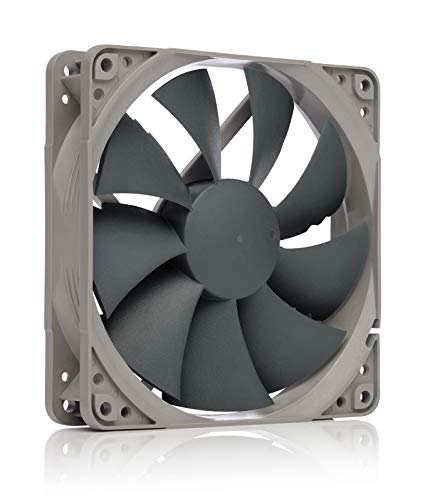 |
Noctua NF-P12 redux-1700 PWM Replacing a case fan |
Check Price |
Top 6 CPU Fans: Detailed Reviews
1. Thermalright Peerless Assassin 120 SE
The Thermalright Peerless Assassin 120 SE is a cpu fan built around a dual-tower heatsink and six 6mm copper heat pipes. Its AGHP design helps maintain heat transfer in different mounting orientations, while two 120mm PWM fans run at up to 1550RPM, delivering up to 66.17CFM each with a stated noise level of 25.6dB(A) or lower. At 155mm tall and 125mm wide, it needs room inside your case. Support covers Intel 115X, 1200, 1700 and 17XX sockets, plus AMD AM4 and AM5.
What We Like:
- The dual-tower design provides substantial air-cooling capacity without requiring a liquid loop.
- Six copper heat pipes move processor heat into the aluminum fin stacks efficiently.
- Two PWM fans can adjust their speed through your motherboard for more controlled cooling.
- The stated 25.6dB(A) maximum noise level suits quieter gaming builds.
- Intel and AMD mounting support covers many current and older mainstream sockets.
What Could Be Improved:
- The 155mm height and 125mm width can limit compatibility with compact cases.
- Its two-fan tower layout may require more installation space than a simpler single-tower cooler.
Buy it if you want serious air cooling for a compatible gaming PC and prefer avoiding liquid hardware. The Peerless Assassin 120 SE is less suitable for compact cases, or for builds where cooler dimensions and installation space are tightly restricted.
2. ARCTIC Liquid Freezer III Pro 360
The ARCTIC Liquid Freezer III Pro 360 is a 360mm AIO CPU cooler for compatible Intel LGA1851 and LGA1700, plus AMD AM4 and AM5 systems. Its three P12 PRO fans deliver stronger airflow and higher maximum speed while staying quieter than the P12, particularly at lower speeds. Native offset mounting moves the cold plate towards the CPU hotspot for more efficient heat transfer. An integrated VRM fan cools the motherboard’s voltage converters, while sleeved fan cables leave only one visible motherboard connection. This is a cpu fan setup built for demanding gaming PCs.
What We Like:
- Three P12 PRO fans provide strong cooling with quieter low-speed operation.
- Offset mounting targets the CPU hotspot for more efficient heat transfer.
- The integrated VRM fan helps keep voltage converters cooler.
- Integrated cable management creates a cleaner installation.
- The contact frame improves pressure distribution on compatible Intel sockets.
What Could Be Improved:
- A 360mm radiator requires a case with enough space for this larger cooling setup.
- Liquid cooling involves more installation hardware and routing than a basic air cooler.
- The extra VRM fan and three radiator fans add more components to manage than a simpler cooler.
Buy it if you want high-performance liquid cooling for a demanding gaming PC and have a case that supports a 360mm radiator. It suits Intel LGA1851 or LGA1700 and AMD AM4 or AM5 builds. Skip it if you prefer a simpler air cooler or lack room for the radiator.
3. Thermalright Peerless Assassin 120 Vision MAX
This cpu fan pairs a dual-tower heatsink with two 120mm fans and six 6mm copper heat pipes, giving your gaming PC a substantial air-cooling setup without a liquid loop. The fans reach 2150 RPM, provide 69 CFM of airflow, and are rated at up to 27 dB(A). Its standout feature is the magnetic top cover with a 5-inch 480×854 IPS display, which can show system parameters, backgrounds, or video through Thermalright’s TRCC software. The matte-black finish suits showcase builds, while the 164mm height demands careful case-clearance checking.
What We Like:
- The twin-tower design offers serious air-cooling hardware for performance-focused gaming PCs.
- The 5-inch IPS display adds real-time system monitoring without requiring a separate screen.
- The magnetic top cover should make removing or repositioning the display simpler.
- AGHP Gen 5.0 heat pipes are designed to maintain heat transfer in vertical and horizontal orientations.
- The matte-black finish and integrated display suit attention-grabbing showcase builds.
What Could Be Improved:
- At 164mm tall, it may not fit narrower PC cases, so check your case specifications first.
- The display’s extra features require Thermalright’s TRCC control software.
- If you only want dependable cooling, the screen adds cost and complexity without improving everyday usability.
Buy this cooler if you want strong-looking dual-tower air cooling and a built-in display for temperatures or custom visuals. It suits showcase gaming PCs and users who enjoy monitoring hardware. Skip it if your case has limited CPU-cooler clearance or you prefer a simpler, screen-free cooler with fewer software-dependent features.
4. Be Quiet! Pure Rock Pro 3 Black
The be quiet! Pure Rock Pro 3 Black is a powerful air cpu fan for gaming PCs that need strong cooling without switching to liquid. Its six nickel-plated copper heat pipes move heat from the CPU into the double tower, while two 120mm PWM Pure Wings 3 fans push air through the fins with optimized blades and added pressure. The offset design improves compatibility with RAM and VRM coolers, and you can adjust the front fan height when needed. Its mounting kit is designed for straightforward installation, including support for AMD AM5 systems.
What We Like:
- Six heat pipes provide a solid path for moving CPU heat into the cooling tower.
- Two 120mm PWM fans balance strong airflow with adjustable speed control.
- The offset layout leaves more room around RAM and VRM coolers than a conventional double tower may offer.
- Adjustable front-fan height helps accommodate different memory clearances.
- The black finish gives the cooler a consistent look in a dark gaming build.
What Could Be Improved:
- As a double-tower cooler, it can still occupy substantial space around the CPU socket despite its offset design.
- The front fan may need height adjustment for RAM clearance, which can affect how neatly the cooler fits in your build.
- Air cooling may not suit you if you specifically want a liquid cooler’s appearance or layout.
Buy the Pure Rock Pro 3 Black if you want strong, quieter air cooling, useful memory clearance, and a relatively approachable installation process. It suits gaming builds using AMD or Intel CPUs, including AM5 systems. Skip it if your case or build cannot accommodate a double-tower cooler, or if you prefer liquid cooling.
5. Cooler Master Hyper 212 Black II
The Cooler Master Hyper 212 Black II is a familiar cpu fan built around four heat pipes and Direct Contact Technology, which transfers heat efficiently from compatible AMD and Intel processors. Its claimed cooling capacity of up to 220W gives you useful headroom for gaming and productivity, while the PWM fan reaches 1,750 RPM and delivers up to 75.19 CFM. The redesigned bracket aims to simplify installation for first-time builders and upgrades. AM5, AM4, LGA1851, and LGA1700 support also keeps it broadly compatible.
What We Like:
- Four heat pipes provide dependable heat transfer for mainstream gaming processors.
- The user-friendly bracket makes installation less intimidating for a first-time builder.
- PWM control lets the fan adjust its speed to the workload.
- The 1,750 RPM fan balances strong airflow with quieter operation.
- The sleek upper cover suits clean, understated desktop builds.
What Could Be Improved:
- Its four-heat-pipe design has less stated cooling capacity than higher-performance coolers built for heavier loads.
- As an air cooler, it does not offer the visual appeal or radiator-based design of liquid cooling.
- The minimalist appearance may feel too plain if you want a showcase-focused build.
Buy the Hyper 212 Black II if you want a straightforward cpu fan for a gaming upgrade, productivity system, or first build with broad modern socket support. Skip it if you run especially demanding processors, need maximum thermal headroom, or specifically want liquid cooling and a more dramatic showcase design.
6. Noctua NF-P12 Redux-1700 PWM
The Noctua NF-P12 redux-1700 PWM is a standalone 120mm cpu fan for replacing a case fan or adding airflow, not a complete heatsink upgrade. Its 4-pin PWM connection lets your motherboard adjust speed automatically, delivering up to 1700 RPM when cooling demand rises and near-silent operation at idle. The pressure-optimised blade design suits chassis ventilation, air coolers and water-cooling radiators, while the 25mm thickness fits standard 120mm mounts. Noctua rates it at up to 25.1 dB(A), with a stated MTTF above 150,000 hours.
What We Like:
- PWM control makes automatic speed adjustment straightforward.
- The 1700 RPM ceiling provides useful airflow when temperatures climb.
- Pressure-optimised blades work for cases, air coolers and radiators.
- The standard 120mm by 25mm format suits common mounts.
- The streamlined redux package keeps Noctua’s proven fan design focused and simple.
What Could Be Improved:
- It is only a fan, so you still need a compatible heatsink or radiator for CPU cooling.
- The 25.1 dB(A) maximum rating means it is not completely silent at full speed.
- Optional accessories such as anti-vibration mounts and extension cables are separate additions.
Buy it if you need a dependable 120mm replacement or an extra PWM-controlled airflow fan for a gaming PC. It makes particular sense for a case, air cooler or radiator that accepts standard 120mm mounting. Skip it if you need a complete CPU cooler, included accessories or a larger fan.
How To Choose A CPU Fan
Choose The Right CPU Fan Type
A good cpu fan purchase starts with deciding between an air cooler, a liquid cooler, or a replacement fan. Air coolers use a heatsink and one or more fans, while liquid coolers move heat to a radiator. A replacement fan makes sense when your existing cooler works but its fan is noisy, worn, or underperforming.
Air cooling is usually the simpler option, with fewer components to position inside your case. Liquid cooling can suit systems that need high cooling performance, but you must have room for the radiator and account for pump and tubing placement.
Check Compatibility Before Buying
Confirm that the cooler supports your processor socket and that its physical size suits your case. Large air coolers can interfere with memory modules, graphics cards, or the side panel, while a radiator needs a compatible mounting position with enough clearance for its fans.
For a replacement fan, check the fan size, connector, mounting holes, and control method. PWM support lets your motherboard adjust fan speed, but you should still confirm that the connector and control settings match your system.
Balance Cooling Performance And Noise
More cooling capacity can help manage demanding workloads and gaming sessions, but performance alone does not determine how pleasant a PC is to use. Fan speed, blade design, heatsink or radiator size, and your case airflow all affect noise.
Look for a cooler that matches your processor and workload rather than automatically choosing the largest option. A fan running at a lower speed may be quieter, while poor case airflow can force even a capable cooler to work harder.
Consider Installation And Long-Term Upkeep
Think about how much installation work you want to handle. Air coolers generally avoid pump connections and radiator positioning, while liquid models add more hardware and cable management. Make sure you have access to the necessary mounting hardware and enough room to work inside the case.
Also consider maintenance. Dust buildup affects fans, heatsinks, and radiators, so choose a layout you can clean easily. A replacement fan is often the most practical fix when the cooler itself remains suitable, but replacing the complete cooler may make more sense if the existing design no longer meets your needs.
Which CPU Fan Should You Choose?
The Thermalright Peerless Assassin 120 SE is the best overall pick because it combines the practical simplicity of air cooling with a high-value focus. Choose the ARCTIC Liquid Freezer III Pro 360 instead if your priority is high-performance liquid cooling and your case supports that setup. The remaining options suit more specific needs: a showcase build, quiet air cooling, a straightforward upgrade, or a replacement case fan.