
As an Amazon Associate I earn from qualifying purchases.
Finding a good budget tablet isn’t easy when you need one that handles everyday tasks without breaking the bank. This guide is for families, students, and casual users who want a reliable device without overspending. A budget tablet should balance performance, screen quality, and battery life without hidden costs. You’ll avoid the frustration of slow updates or storage that fills up too quickly.
Screen size, processor power, and storage top the list when picking a budget tablet. The most common mistake is choosing the cheapest option without checking real-world performance. A larger screen helps with multitasking, while a decent processor keeps apps running smoothly. Storage matters more than you think—8GB of RAM and 128GB of space prevent slowdowns over time.
These picks come from scanning Amazon listings, comparing specs like display resolution, RAM, and battery capacity. Customer ratings helped narrow the field, focusing on models with consistent praise for reliability. Only tablets with at least 8GB RAM or 128GB storage made the cut to avoid immediate upgrades.
The Samsung Galaxy Tab A11+ 128GB Gray leads the list because it delivers a big 11-inch screen, solid performance, and enough storage for families. Next, you’ll see five more options tailored to different needs, from students to power users, all under tight budgets.
Our Top 6 Budget Tablets Picks At A Glance
| Product | ||
|---|---|---|
 |
Samsung Galaxy Tab A11+ 128GB Gray families and multitaskers |
Check Price |
 |
Lenovo Idea Tab 11" 2.5K 128GB students and creators |
Check Price |
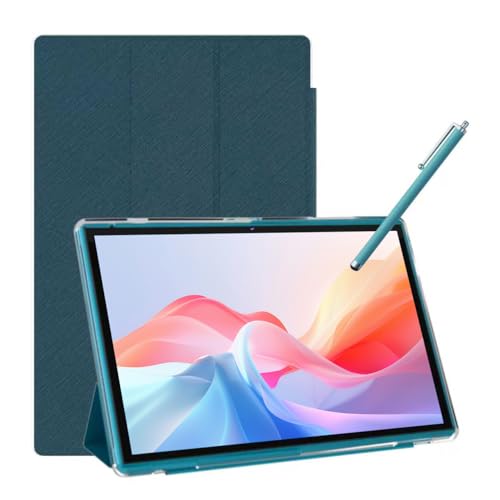 |
NOVOJOY 10" Android 15 8GB 32GB casual users and kids |
Check Price |
 |
TECLAST P35 10" Android 16 16GB 32GB power users and streamers |
Check Price |
 |
Lenovo Tab One 8.7" HD 64GB portability and media |
Check Price |
 |
HOTTABLET 7" Android 14 8GB 32GB tight budgets and small hands |
Check Price |
Top 6 Budget Tablets: Detailed Reviews
1. Samsung Galaxy Tab A11+ 128GB Gray
The Samsung Galaxy Tab A11+ is a budget tablet built for families who need a big screen and reliable performance without overspending. Its 11-inch 90Hz display makes scrolling and videos smooth, while 8GB of RAM handles multitasking—opening multiple apps or browser tabs—without slowdowns. The 128GB storage is expandable via microSD, so you can store photos, videos, or games. A long battery life means it lasts through a full day of use, and fast charging tops it up quickly when needed.
What We Like:
- 11-inch 90Hz screen for fluid scrolling and video playback
- 8GB RAM keeps multitasking smooth even with several apps open
- 128GB storage (expandable) for photos, videos, and games
- Long battery life supports a full day of use
- Quad speakers with Dolby audio for decent sound quality
What Could Be Improved:
- No fingerprint reader for quick unlocking
- Plastic build feels less premium than pricier tablets
- Software updates may be slower than flagship models
Buy this if you want a big, smooth-screen tablet for family use under $300. Skip it if you need premium materials or frequent software updates.
2. Lenovo Idea Tab 11&Quot; 2.5K 128GB
The Lenovo Idea Tab is a budget tablet built for students and creators who need sharp visuals and smooth performance. Its 11-inch 2.5K IPS display with a 90Hz refresh rate delivers crisp text and vibrant colors, making it easier to read study materials or edit photos. The MediaTek Dimensity 6300 chip handles multitasking and light creative work without lag, while the included Lenovo Tab Pen lets you jot down notes or sketch directly on the screen.
What We Like:
- 11-inch 2.5K 90Hz display keeps everything sharp and responsive for note-taking and media
- MediaTek Dimensity 6300 chip handles multitasking and light creative work smoothly
- Lenovo Tab Pen support makes it easy to write, sketch, or annotate without extra purchases
- All-day battery life lasts through study sessions and streaming breaks
- Built-in AI-powered apps like Lenovo AI Note and Squid help organize and enhance your work
What Could Be Improved:
- 8GB RAM configuration isn’t the highest in its class, which may limit heavy multitasking
- 128GB storage fills up quickly if you store large media files or apps
- Speakers are decent but not exceptional for immersive audio
Buy this if you’re a student or creator who needs a responsive display and pen support on a budget. Skip it if you need top-tier performance or premium audio for professional work.
3. NOVOJOY 10&Quot; Android 15 8GB 32GB
The NOVOJOY 10-inch tablet packs a 10.1" IPS HD screen, 6000mAh battery, and a bundled stylus with a foldable case for $120. The HD display is bright enough for streaming and casual browsing, while the stylus lets you jot notes or sketch without extra accessories. The 8GB RAM and 32GB storage handle light multitasking, though you’ll need the microSD slot for more space. Battery life lasts a full day of mixed use, and the Type-C charging is convenient.
What We Like:
- 10.1" IPS HD screen delivers clear, color-rich visuals for videos and reading
- 6000mAh battery supports 6–8 hours of continuous use and 360 hours on standby
- Included stylus works for notes, sketches, and quick annotations
- Foldable leather case adds protection and doubles as a stand
- Android 15 keeps software current with minor updates
What Could Be Improved:
- Storage is limited to 32GB out of the box, so expand via microSD for media-heavy use
- Processor is quad-core, so don’t expect heavy gaming or video editing
- Case feels durable but adds bulk compared to slimmer tablets
Buy this if you need a simple, all-in-one tablet for streaming, light work, or kids. Skip it if you want a powerhouse for gaming or heavy creative apps.
4. TECLAST P35 10&Quot; Android 16 16GB 32GB
The TECLAST P35 is a 10-inch budget tablet running Android 16 with Widevine L1 certification, letting you stream Netflix and other services in HD without compromise. The 16GB RAM (3GB physical + 13GB virtual) keeps app switching smooth, while 32GB storage plus microSD support up to 2TB handles media and files. A 6000mAh battery claims 10–12 hours of video playback, and the HD IPS screen with blue-light filter is decent for casual use.
What We Like:
- Widevine L1 support for HD streaming on Netflix and similar apps
- 16GB RAM handles multitasking without noticeable lag
- 2TB microSD expansion for storing large media libraries
- 6000mAh battery lasts a full day of light use
- Android 16 with full Google Play access for apps and updates
What Could Be Improved:
- 32GB built-in storage fills up quickly with apps and media
- HD IPS screen is only 1280×800, not sharp for text-heavy tasks
- Unisoc T7200 processor isn’t built for heavy gaming or 3D work
Buy the TECLAST P35 if you need a cheap tablet for streaming, browsing, and light multitasking. Skip it if you want a sharp display for reading or a device for demanding games or apps.
5. Lenovo Tab One 8.7&Quot; HD 64GB
The Lenovo Tab One is a compact 8.7-inch HD tablet built for portability and quick entertainment. Its MediaTek Helio G85 processor and 60Hz refresh rate handle browsing, light gaming, and streaming smoothly, though don’t expect flagship speeds. The 12.5-hour battery life for YouTube streaming means you can leave the charger at home for a full day out. The 480-nit HD screen delivers decent colors indoors, but outdoor visibility suffers in bright light. At under a pound, it fits easily in a bag or even a large pocket.
What We Like:
- Weighs less than a pound for true one-handed use
- 12.5-hour battery life for YouTube streaming on the go
- Includes a folio case with a built-in stand for hands-free viewing
- 480-nit HD display with Dolby Atmos for decent audio
- Faster 15W charging than previous Lenovo models
What Could Be Improved:
- 60Hz refresh rate limits smoothness for fast-paced games
- HD resolution feels dated next to 2K competitors
- Outdoor screen visibility is poor in direct sunlight
Buy this if you need a lightweight tablet for media and casual use. Skip it if you want sharper visuals, outdoor-friendly brightness, or heavy multitasking.
6. HOTTABLET 7&Quot; Android 14 8GB 32GB
The HOTTABLET 7-inch budget tablet runs Android 14 on 8 GB of RAM and 32 GB of storage, with a 3000 mAh battery and a 7-inch HD IPS screen that cuts blue light. Dual-band Wi-Fi keeps you connected whether you’re streaming or browsing. At under $80 it’s the smallest entry in the list, so it fits tight budgets and small hands, but the 1024×600 resolution won’t impress if you expect sharp text or photos.
What We Like:
- 7-inch IPS screen with eye-care tech reduces eye strain during long sessions
- Android 14 gives you current software features and longer support than older tablets
- Dual-band Wi-Fi handles both crowded networks and high-speed streaming reliably
- 3000 mAh battery lasts a full day of light use or several hours of video
- Lightweight design and included case make it easy to toss in a bag or hand to a child
What Could Be Improved:
- 1024×600 resolution looks soft for reading fine text or detailed images
- 32 GB storage fills up quickly if you install many apps or games
- Performance lags when you run more than a couple of apps at once
Buy this tablet if you need a cheap, portable device for light browsing, streaming, or kids. Skip it if you want crisp text, heavy multitasking, or lots of storage.
How To Choose The Right Budget Tablet
A budget tablet isn’t just a stripped-down device—it’s a tool that should fit how you actually use it. Start with the screen because it’s the first thing you’ll notice every time you pick it up. A 10-inch display is the sweet spot for most people: big enough for videos and browsing, small enough to hold in one hand. Anything smaller than 8 inches feels cramped for media, while anything larger than 11 inches starts to feel like a laptop you have to carry. Resolution matters too; 1920×1200 or better keeps text sharp and colors vibrant, especially if you read or watch shows for long stretches.
Performance That Won’t Quit Before You Do
You don’t need flagship power, but you do need enough to avoid lag when you’re switching between apps or streaming. Look for a processor that’s at least a mid-range chip from the last two years—something like a MediaTek Helio G-series or a Qualcomm Snapdragon 600-series. RAM is the next bottleneck; 4GB is the bare minimum for smooth multitasking, but 6GB or more gives you breathing room for future updates. Storage is where budget tablets cut corners: 64GB is fine if you mostly use cloud services, but 128GB or more is better if you download movies, games, or photos. MicroSD slots help, but they’re slower than internal storage, so don’t rely on them as your main option.
Battery Life That Matches Your Day
Screen size and resolution directly impact how long the battery lasts. A 10-inch tablet with a 7000mAh battery should give you 8–10 hours of mixed use, which is enough for a workday or a long flight. Cheaper tablets often skimp on battery capacity, so check the specs carefully. Fast charging is a nice bonus, but it’s rare on budget models—plan on plugging in overnight. If you’re a heavy traveler, consider a tablet with a detachable case that doubles as a power bank; it’s an extra cost, but it solves two problems at once.
Build And Extras That Add Up
Plastic bodies are lighter and cheaper, but they feel less premium than metal. Kids or clumsy users might prefer rubberized edges or a reinforced frame. A headphone jack is still useful if you listen to music or podcasts without Bluetooth headphones. Cameras are an afterthought on budget tablets, but a decent rear camera (8MP or higher) helps if you occasionally need to scan documents or take quick photos. Wi-Fi 6 support is overkill for most people, but it future-proofs the device if your router supports it. Finally, check the warranty and update policy—some brands offer two years of software support, while others cut it short to save costs.
Which Budget Tablet Should You Buy
The Samsung Galaxy Tab A11+ 128GB Gray is the best overall budget tablet because it balances performance, screen size, and storage without breaking the bank. If you need something smaller or lighter, the Lenovo Tab One 8.7″ HD 64GB is the most portable choice that still handles everyday tasks well. For students or creators, the Lenovo Idea Tab 11″ 2.5K 128GB offers the best screen and battery life in its price range.