
As an Amazon Associate I earn from qualifying purchases.
Finding a reliable laptop college windows can feel overwhelming when you need something that lasts through semesters of note-taking, research, and late-night projects. This guide is for students who want a Windows machine that balances performance, battery life, and price without unnecessary bloat. You’ll see options that fit different budgets and workloads, from light web browsing to heavy multitasking.
Three things matter most in a college laptop windows: screen size for long study sessions, processor power for smooth performance, and battery life for all-day use. The biggest mistake buyers make is prioritizing specs over real-world usability—like picking a gaming laptop that dies after two hours. Portability and build quality also separate a good choice from a regret.
These picks come from scanning Amazon listings for Windows laptops under $800, focusing on processor type, RAM, storage, and customer ratings. Models with at least 8GB RAM and 256GB SSD were favored, while ultra-budget options were included only if they met basic needs. Ratings and review counts helped filter out unreliable picks.
The HP OmniBook 3 17.3 inch laptop PC leads this list because its large screen and solid specs make multitasking effortless for students who juggle research, writing, and media. Next, you’ll find five more options that fit different needs and budgets, each with honest pros and cons.
Our Top 6 College Laptops With Windows Picks At A Glance
| Product | ||
|---|---|---|
 |
HP OmniBook 3 17.3 inch Laptop PC big screen multitasking |
Check Price |
 |
Dell 15.6 Laptop Intel Core 3 100U all-day productivity |
Check Price |
 |
MITUNTUN 15.6 Inch Laptop Windows 11 Pro heavy multitasking |
Check Price |
 |
SAGAWHALE 15.6 inch Laptop Windows 11 Pro budget performance |
Check Price |
 |
HP New Everyday Slim Laptop 2027 Edition portable productivity |
Check Price |
 |
Unowo 15.6 inch Laptop Windows 11 budget basics |
Check Price |
Top 6 College Laptops With Windows: Detailed Reviews
1. HP OmniBook 3 17.3 Inch Laptop PC
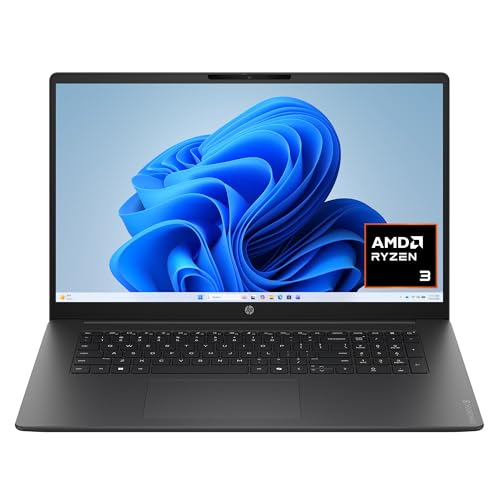
The HP OmniBook 3 17.3-inch laptop is built for students who need space to work and play. Its 17.3-inch FHD IPS display delivers sharp, color-accurate visuals with wide viewing angles, so you can share notes or watch lectures without color shifts. The AMD Ryzen 3 30 processor handles everyday tasks—multitasking, streaming, and light photo editing—without lag, while the AMD Radeon 610M graphics smooths out video playback and casual gaming. With 8GB of LPDDR5 RAM and a 512GB PCIe NVMe SSD, it boots fast and keeps files accessible. Battery life stretches up to 14 hours and 15 minutes, and HP Fast Charge tops it to 50% in 45 minutes, so you’re not tethered to an outlet during long study sessions.
What We Like:
- 17.3-inch FHD IPS display with 178-degree viewing angles for shared screen work
- AMD Radeon 610M graphics handles streaming and casual gaming smoothly
- Up to 14 hours and 15 minutes of battery life with fast charging to 50% in 45 minutes
- 8GB LPDDR5 RAM and 512GB PCIe NVMe SSD for quick multitasking and storage
- Advanced AI noise reduction for clearer team calls by filtering background noise
What Could Be Improved:
- Ryzen 3 30 processor isn’t suited for heavy workloads like video editing or 3D modeling
- Plastic chassis feels less premium compared to aluminum competitors
- Fan noise can get noticeable under sustained load
Buy this if you want a big, bright screen for note-taking, streaming, and light multitasking without breaking the bank. Skip it if you need serious performance for heavy creative work or prefer a lighter, more durable build.
2. Dell 15.6 Laptop Intel Core 3 100U
The Dell 15.6 laptop targets college students who need a reliable Windows machine for daily coursework. Its 15.6-inch anti-glare FHD screen cuts reflections in bright dorm rooms or libraries, making long study sessions easier on your eyes. Express Charge restores 80% battery in about an hour, so a quick plug-in between classes keeps you going through the day. The Intel Core 3 100U handles multitasking—notes, research, and streaming—without lag, while 8GB RAM and a 512GB SSD give you space for files and speed for booting up.
What We Like:
- 15.6-inch anti-glare FHD screen reduces eye strain in bright environments
- Express Charge restores 80% battery in about an hour for all-day campus use
- Intel Core 3 100U and 8GB RAM handle everyday multitasking smoothly
- 512GB SSD provides fast storage for documents and applications
- McAfee 30-day trial included for basic online security
What Could Be Improved:
- Plastic build feels less premium than aluminum alternatives
- No backlit keyboard, which matters if you study in dim lighting
- Only 8GB RAM may limit heavy multitasking or future-proofing
Buy this if you want a no-frills Windows laptop for note-taking, web browsing, and light projects. Skip it if you need a backlit keyboard, more RAM, or a metal chassis.
3. MITUNTUN 15.6 Inch Laptop Windows 11 Pro
The MITUNTUN 2026 is a 15.6-inch Windows 11 Pro laptop built for students who juggle heavy workloads. The 16GB RAM handles dozens of browser tabs and demanding apps without lag, while the 256GB SSD boots Windows and loads files quickly. The Intel Core M3 processor keeps pace for everyday tasks and light multitasking. At 3.5 lbs and 0.8 inches thick, it fits in a backpack but won’t crowd your lap during long study sessions.
What We Like:
- 16GB RAM keeps 20+ browser tabs and apps open without slowdowns
- 256GB SSD boots Windows and loads files in seconds
- 2-year warranty covers defects and accidental damage
- Full-size keyboard and 5000mAh battery last through a full day of classes
- FHD display is sharp for streaming, documents, and design work
What Could Be Improved:
- Intel Core M3 struggles with heavy video editing or gaming
- 256GB SSD fills up fast if you store large files locally
- Plastic chassis feels less premium than aluminum competitors
Buy this if you need a reliable, no-fuss laptop for schoolwork and light creative tasks. Skip it if you edit video, game, or need more than a year of warranty coverage.
4. SAGAWHALE 15.6 Inch Laptop Windows 11 Pro
The SAGAWHALE 2026 Windows 11 Pro laptop is a budget-friendly college machine built for students who need reliable performance without overspending. The 16GB RAM keeps everything smooth whether you’re juggling research tabs, a word processor, and a video call. The 256GB SSD boots fast and loads files quickly, so you’re not waiting on storage. The 15.6-inch FHD IPS screen delivers sharp visuals for note-taking, streaming, or late-night study sessions. Windows 11 Pro is pre-installed, so you’re ready to work right away.
What We Like:
- 16GB RAM handles multitasking without lag, even with 10+ browser tabs open
- 256GB SSD boots in under 20 seconds and loads files instantly
- FHD IPS display shows clear text and vibrant colors for long study sessions
- Windows 11 Pro is pre-installed, so you skip setup and start using it immediately
- 2-year warranty with 6-month returns and 24/7 support gives peace of mind
What Could Be Improved:
- 256GB SSD fills up fast if you store large files or games
- Plastic build feels less premium than pricier laptops
- Battery life is decent but not all-day—expect 6-7 hours with moderate use
Buy this if you need a no-frills laptop for schoolwork under $400. Skip it if you need more storage, longer battery life, or a sturdier chassis.
5. HP New Everyday Slim Laptop 2027 Edition
The HP New Everyday Slim Laptop 2027 Edition is a 14-inch Windows laptop built for students who need a lightweight machine for daily tasks. The 14-inch HD anti-glare display keeps glare off your screen in bright rooms, making it easier to study or watch lectures without squinting. Microsoft 365 comes preinstalled, so you can start typing papers or creating spreadsheets right away, while 1TB of OneDrive cloud storage keeps your files backed up and accessible from any device. The Intel N150 processor and Intel Graphics handle web browsing, video calls, and light multitasking smoothly without draining the battery.
What We Like:
- 14-inch anti-glare display reduces eye strain during long study sessions
- Microsoft 365 and 1TB OneDrive storage included for immediate productivity
- Lightweight at 3.24 lbs with up to 12 hours of battery life for all-day use
- Wi-Fi 6 and Bluetooth 5.0 ensure fast, stable connections for online classes
- Port selection includes USB-C, HDMI, and an SD card reader for versatile use
What Could Be Improved:
- 128GB SSD is tight for storing large files like videos or games
- HD resolution limits sharpness for detailed work like photo editing
- No backlit keyboard, which can be frustrating in dim lighting
Buy this if you need a simple, portable laptop for schoolwork and light tasks. Skip it if you need more storage, a sharper screen, or a backlit keyboard.
6. Unowo 15.6 Inch Laptop Windows 11
The Unowo 15.6-inch laptop is a no-frills Windows machine built for students who need a quiet, portable system for note-taking and light multitasking. Its fanless design keeps noise out of libraries and classrooms, while the 180-degree lay-flat hinge lets you prop it up like a tablet for scribbling notes or reading PDFs. The 1080p IPS display is bright enough for indoor use, and Office 365 preinstalled covers the basics of essays and spreadsheets without extra setup.
What We Like:
- Fanless cooling means zero noise, ideal for shared study spaces.
- 180-degree hinge turns the screen into a makeshift notepad for handwritten notes.
- Office 365 included saves the hassle of buying and installing the suite separately.
- Lightweight and slim for tossing in a backpack between classes.
- Type-C PD port charges fast and doubles as a data port for peripherals.
What Could Be Improved:
- 4GB RAM limits heavy multitasking—expect slowdowns with many browser tabs open.
- 128GB storage fills up quickly if you save photos or large files locally.
- Celeron N4020 processor struggles with demanding apps like video editors or IDEs.
Buy this if you need a silent, portable laptop for notes, web browsing, and Office work on a tight budget. Skip it if you plan to run heavier software or store lots of files locally.
How To Pick The Right Windows Laptop For College
You’ll get the most out of your laptop college windows choice when you match it to your daily routine. Start with screen size and resolution. A 15.6-inch display is the sweet spot for portability and usable workspace, while a 17.3-inch screen gives you room for two documents or a browser plus notes without squinting. If you sketch, code, or watch lectures, a 1080p panel is fine; 4K is overkill and drains battery faster.
Performance That Keeps Up With Your Workload
Look at the processor first. Intel Core i3 or Ryzen 3 chips handle documents, email, and Zoom calls without sweat. Move up to i5 or Ryzen 5 if you run heavier software, compile code, or keep dozens of browser tabs open. RAM matters too—8 GB is the minimum for smooth multitasking; 16 GB future-proofs you for a few years. Storage speed beats size for everyday use: a 256 GB SSD boots Windows fast and loads apps quickly; 512 GB is better if you keep media files on board.
Battery Life That Outlasts Your Longest Day
Real-world battery life rarely matches the manufacturer’s claim. Aim for at least 8 hours of mixed use—web, docs, video calls—before you plug in. Laptops with 50 Wh batteries or larger usually hit this target. Lightweight models with 45 Wh batteries can dip below 6 hours when you crank the screen brightness. If you’ll be in lecture halls all day, prioritize a bigger battery or a model with fast-charging so you’re back to 50% in 30 minutes.
Build And Ports That Survive The Backpack
Plastic chassis keeps weight down and cost low, but metal frames resist dings better if you toss your laptop around. Check the hinge: it should open with one hand and stay put on your lap. Port selection matters more than you think. Two USB-A ports and one USB-C/Thunderbolt let you plug in a mouse, flash drive, and external monitor without a dongle. An HDMI port and SD card reader save you from carrying adapters. Wi-Fi 6 and Bluetooth 5.2 keep your connection stable in crowded lecture halls.
Final Thoughts On Choosing A Windows Laptop For College
The HP OmniBook 3 17.3 inch Laptop PC is the best overall laptop college windows pick for students who value screen space and multitasking above all else. If you need something lighter and still capable, the HP New Everyday Slim Laptop 2027 Edition is the best alternative—it balances portability with enough power for everyday coursework without breaking the bank.