
As an Amazon Associate I earn from qualifying purchases.
Finding the right wireless gaming keyboard means balancing low latency with reliable battery life and a layout that fits your play style. This guide is for competitive gamers who need a keyboard that won’t tether them to a desk but still delivers the responsiveness they demand. If you’re tired of cables snagging or batteries dying mid-match, a good wireless gaming keyboard solves both problems without sacrificing performance. You’ll see picks that prioritize speed, endurance, and comfort for serious play.
Three factors matter most: polling rate for input lag, switch type for feel, and battery life for uninterrupted sessions. The most common mistake is assuming all wireless keyboards are equal—some introduce noticeable delay or require frequent charging. Build quality and keycap material also affect durability, so don’t overlook those details when comparing models.
These picks come from scanning Amazon listings, comparing specs like switch options, battery capacity, and connectivity tech. Customer ratings helped narrow the field, focusing on models with consistent praise for reliability and performance. No hands-on testing was done, but the selections reflect what buyers value most in a wireless gaming keyboard.
The AULA F75 Pro Wireless Mechanical Keyboard tops the list for its hot-swap customization and solid wireless performance. Next, we break down the pros and cons of each pick, from ultra-compact setups to full-size layouts, so you can decide which fits your rig and playstyle.
Our Top 6 Wireless Gaming Keyboards Picks At A Glance
| Product | ||
|---|---|---|
 |
AULA F75 Pro Wireless Mechanical Keyboard custom hot-swap builds |
Check Price |
 |
Logitech G515 LIGHTSPEED TKL Wireless Keyboard low-profile gamers |
Check Price |
 |
Logitech G PRO X 60% Wireless Keyboard ultra-compact setups |
Check Price |
 |
Razer BlackWidow V4 TKL Wireless Keyboard switch customizers |
Check Price |
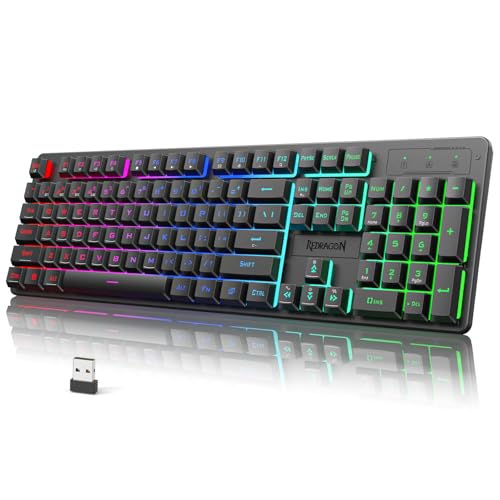 |
Redragon K521KS Wireless Gaming Keyboard budget wireless gaming |
Check Price |
 |
Redragon K556 PRO Wireless RGB Mechanical Keyboard full-size wireless gaming |
Check Price |
Top 6 Wireless Gaming Keyboards: Detailed Reviews
1. AULA F75 Pro Wireless Mechanical Keyboard
The AULA F75 Pro is a 75% wireless mechanical keyboard packed into a compact layout. You get tri-mode connectivity—Bluetooth 5.0, 2.4GHz wireless, and wired—so you can switch between devices or stay plugged in without lag. The hot-swap PCB lets you pop in 3-pin or 5-pin switches without soldering, making it easy to experiment or replace worn keys. Pre-lubed Reaper switches arrive smooth out of the box, saving you the hassle of break-in. A side-printed PBT keycap set resists shine and keeps legends crisp over time.
What We Like:
- 75% layout saves desk space without cramping your fingers
- Hot-swap PCB lets you change switches on the fly, no tools needed
- Pre-lubed switches feel polished from day one
- Knob adjusts brightness and volume without hunting through menus
- PBT keycaps resist shine and keep legends readable for years
What Could Be Improved:
- Knob is stiff at first and needs a few rotations to loosen up
- RGB lighting lacks per-key customization—only preset effects
- Battery life is decent but not class-leading; expect 20–30 hours with RGB on
Buy the AULA F75 Pro if you want a compact, hot-swap keyboard you can tweak without soldering. Skip it if you need long battery life or per-key RGB control.
2. Logitech G515 LIGHTSPEED TKL Wireless Keyboard
The Logitech G515 LIGHTSPEED TKL is a wireless mechanical keyboard built for gamers who want a slim, tenkeyless design without sacrificing performance. Its GL Red linear switches offer a fast, smooth keystroke with factory lubrication, ideal for rapid inputs. You get up to 36 hours of battery life on a single charge, which is enough for long sessions without constant recharging. The tri-mode connectivity—LIGHTSPEED wireless, Bluetooth, or wired—gives you flexibility whether you’re gaming on PC, console, or even a secondary device.
What We Like:
- GL Red switches feel smooth and register quickly, perfect for competitive play
- 36-hour battery life handles marathon sessions without interruption
- Tri-mode connectivity works seamlessly across PC, consoles, and mobile
- PBT keycaps resist wear and oil, keeping legends sharp over time
- KEYCONTROL lets you program up to 15 functions per key for deep customization
What Could Be Improved:
- Low-profile switches may feel too shallow for typists used to standard key travel
- Battery life drops faster with RGB lighting on compared to other models
- No dedicated macro keys, so advanced customization relies on software
Buy this if you need a slim, wireless TKL with solid battery life and smooth switches for gaming. Skip it if you prefer deeper key travel or need dedicated macro keys for complex setups.
3. Logitech G PRO X 60% Wireless Keyboard
The Logitech G PRO X 60% Wireless is a compact, tournament-grade keyboard built for esports players who need precision without desk clutter. Its 60% layout strips away numpad and function rows, freeing up mouse space for aggressive playstyles. The optical switches deliver sub-1ms actuation with no debounce delay, so every press registers instantly—critical for fast-paced games. G HUB software lets you remap keys across five layers, turning this tiny board into a full control center. LIGHTSYNC RGB adds visual feedback, while LIGHTSPEED wireless keeps latency low for wired-like performance.
What We Like:
- Optical switches give you instant actuation with zero debounce delay, so your inputs match your reflexes.
- 5 customizable layers let you program complex macros or game-specific layouts without clutter.
- LIGHTSPEED wireless delivers 1ms response time, matching wired performance for competitive play.
- 60% layout maximizes desk space for mouse movement, ideal for high-DPI aimers.
- G HUB software supports per-key RGB customization, so you can highlight critical keys.
What Could Be Improved:
- No dedicated arrow keys or numpad make it less versatile for productivity tasks.
- Battery life is solid but not exceptional—expect around 20-30 hours with RGB on.
- Optical switches require more force to actuate than traditional mechanical switches, which can fatigue your fingers during long sessions.
Buy this if you play fast-paced shooters or MOBAs and prioritize desk space and instant inputs. Skip it if you need a full layout for work or prefer lighter switch actuation.
4. Razer BlackWidow V4 TKL Wireless Keyboard
The Razer BlackWidow V4 TKL Wireless is a tenkeyless gaming keyboard designed for players who want clean acoustics and customizable feel without sacrificing wireless performance. Its hot-swappable switch sockets accept both 3-pin and 5-pin mechanical switches, letting you change out Orange Tactile Gen-3 switches—or any other 3rd-party switch—in seconds. A stainless-steel top plate, PCB tape, lubricated stabilizers, and dual foam layers cut down on ping and rattle, giving you a quieter, more refined typing and gaming experience. The HyperSpeed Wireless link keeps latency low while Bluetooth lets you juggle work, gaming, and media across three devices.
What We Like:
- Hot-swappable switches let you experiment with different tactile, linear, or clicky feels without soldering
- Stainless-steel plate plus foam and lubricated stabs deliver noticeably cleaner sound and firmer bottoming out
- HyperSpeed Wireless keeps input lag low for competitive play, while Bluetooth adds seamless multi-device switching
- Multi-function roller and three dedicated buttons give quick access to media, audio, and lighting controls
- Up to 980 hours of Bluetooth battery life means weeks between charges during everyday use
What Could Be Improved:
- Stainless-steel plate increases weight and makes the board feel less portable than plastic-plate alternatives
- Orange Tactile switches are decent but not the best choice for rapid double-taps; linear or clicky options may suit faster genres better
- Razer Synapse software is required for full remapping and lighting customization, which some users avoid for privacy reasons
Buy this if you want a wireless TKL with clean acoustics, hot-swappable switches, and long battery life for both gaming and work. Skip it if you prefer ultra-light travel boards or prefer switches other than Razer Orange Tactile.
5. Redragon K521KS Wireless Gaming Keyboard
The Redragon K521KS is a wireless gaming keyboard with tri-mode connectivity—Bluetooth, 2.4GHz wireless, and USB-C wired—so you can switch between devices effortlessly within 10 meters. It packs a 4000mAh battery for long sessions and includes programmable software to customize RGB lighting, macros, and key functions. The mechanical-feel keys prioritize fast actuation for competitive play, while anti-ghosting ensures every key press registers accurately. Multimedia keys add convenience for gaming or office tasks.
What We Like:
- Tri-mode connectivity lets you use it with multiple devices without lag.
- 4000mAh battery keeps it running for extended gaming marathons.
- Programmable software lets you tailor lighting, macros, and key assignments.
- Mechanical-feel keys provide responsive feedback for competitive play.
- 12 multimedia keys streamline gaming or productivity tasks.
What Could Be Improved:
- Software setup can be clunky and requires a download from Redragon’s site.
- RGB customization is limited compared to higher-end keyboards.
- Build quality feels plasticky under heavy use.
Buy this if you need a budget-friendly wireless keyboard with tri-mode connectivity and long battery life. Skip it if you prioritize premium build quality or advanced RGB customization.
6. Redragon K556 PRO Wireless RGB Mechanical Keyboard
The Redragon K556 PRO is a full-size wireless gaming keyboard built around an aluminum frame that eliminates flex and wobble during long sessions. It uses tri-mode connectivity—USB-C, Bluetooth, and 2.4GHz wireless—so you can switch devices without re-pairing and still get near-wired latency. The included quiet linear switches deliver smooth, low-noise keystrokes, and the hot-swap sockets let you change switches without soldering.
What We Like:
- Aluminum frame stays rigid under heavy typing or gaming
- Tri-mode connectivity works with PC, console, and even tablets
- Quiet linear switches feel smooth and won’t disturb others
- Hot-swap sockets let you upgrade switches anytime
- RGB lighting has 20 presets plus software customization
What Could Be Improved:
- RGB software is basic compared to Logitech or Razer
- Battery life is decent but not class-leading
- Keycaps are ABS plastic, not PBT
Buy this if you want a solid, full-size wireless keyboard with hot-swap flexibility and quiet operation. Skip it if you need premium keycaps or advanced software features.
How To Choose A Wireless Gaming Keyboard
What Matters Most In A Wireless Gaming Keyboard
You need to match the keyboard to your play style and setup. The biggest decision is size. Full-size boards give you dedicated arrow keys and a numpad, which some games rely on. TKL (tenkeyless) boards drop the numpad to save desk space and keep your mouse closer. 60% boards shrink further by removing arrow keys and function rows, forcing you to use layers for those inputs.
Switch type and feel decide how the keys respond under your fingers. Linear switches like Cherry MX Red offer smooth keystrokes with no bump or click, good for rapid repeats in shooters. Tactile switches like Cherry MX Brown give a small bump on press, helping you confirm inputs without bottoming out. Clicky switches like Cherry MX Blue add an audible click, which can be satisfying but distracting in fast-paced matches.
Battery Life And Connection Stability
Wireless keyboards run on batteries, so check how long they last between charges. Some boards last 50–100 hours on a single charge; others hit 200+ hours. A low-battery LED or on-screen warning helps you avoid sudden shutdowns mid-match. Connection stability matters too. Dual-mode boards that support both 2.4 GHz wireless and Bluetooth give you flexibility, but 2.4 GHz usually offers lower latency and fewer dropouts. If you play on multiple devices, Bluetooth is convenient, but expect a slight input delay.
Build Quality And Customization
Durability keeps a keyboard usable for years. Look for PBT keycaps, which resist shine and wear better than ABS. A metal or reinforced plastic frame prevents flex under heavy typing or gaming. Hot-swappable switches let you change keys without soldering, which is handy if you want to experiment with different switch types. Some boards include software for remapping keys or adjusting RGB lighting, but that software can slow down over time or conflict with other tools.
Price And Extras
Wireless gaming keyboards range from budget models under $80 to premium boards over $200. Budget boards often cut corners on battery life, build quality, or switch options. Mid-range boards strike a balance, while high-end models add premium switches, better stabilizers, and longer warranties. Extras like dedicated media controls, wrist rests, or multi-device pairing can be useful, but don’t pay extra for features you won’t use.
Which Wireless Gaming Keyboard Should You Buy
If you want the most versatile wireless gaming keyboard, the Logitech G515 LIGHTSPEED TKL is the best overall pick. It delivers reliable 2.4 GHz performance, low-profile switches, and solid battery life in a compact form. For a budget-friendly alternative, the Redragon K521KS offers hot-swappable switches and decent wireless performance without breaking the bank.